Dayling

For iPhone and iPad

Start your routines. Finish them. Feel good about it.

Visual step-by-step routines with a kind companion pet. Clear pictures, calm timers and gentle reminders, with no pressure and no guilt.

Coming soon to theApp StoreSee how it works
  • Free to download
  • No ads or accounts
  • Works offline
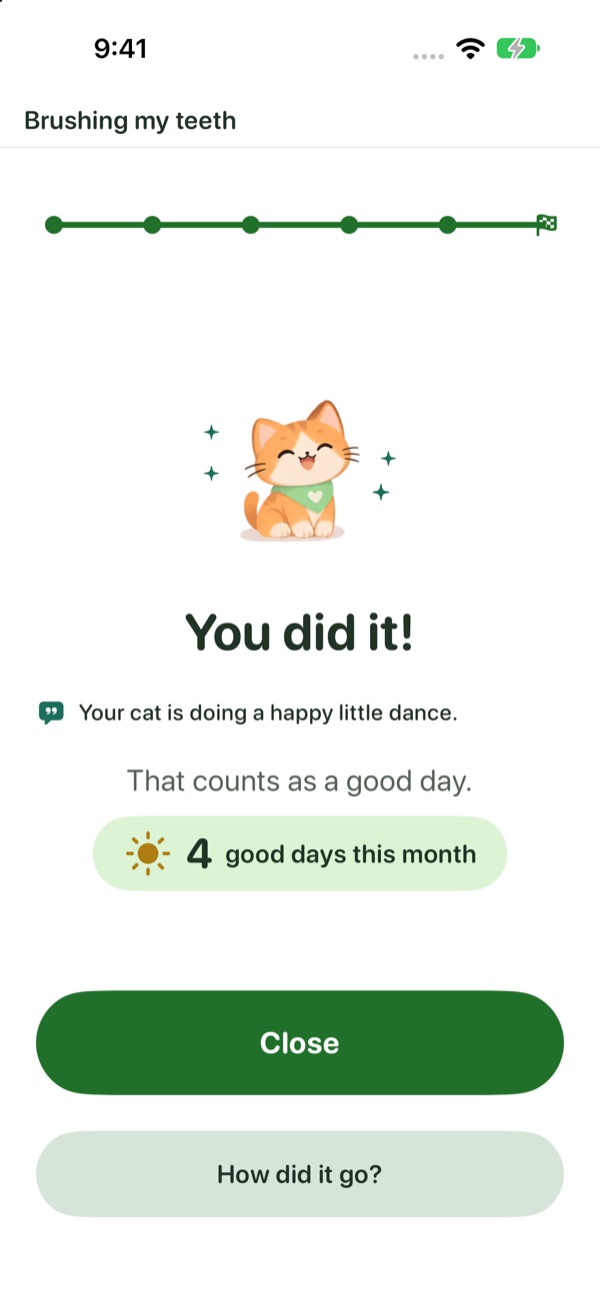
The end of a routine in Dayling: a ginger kitten celebrating with sparkles, above "You did it! That counts as a good day." and "4 good days this month"

Your day in Dayling

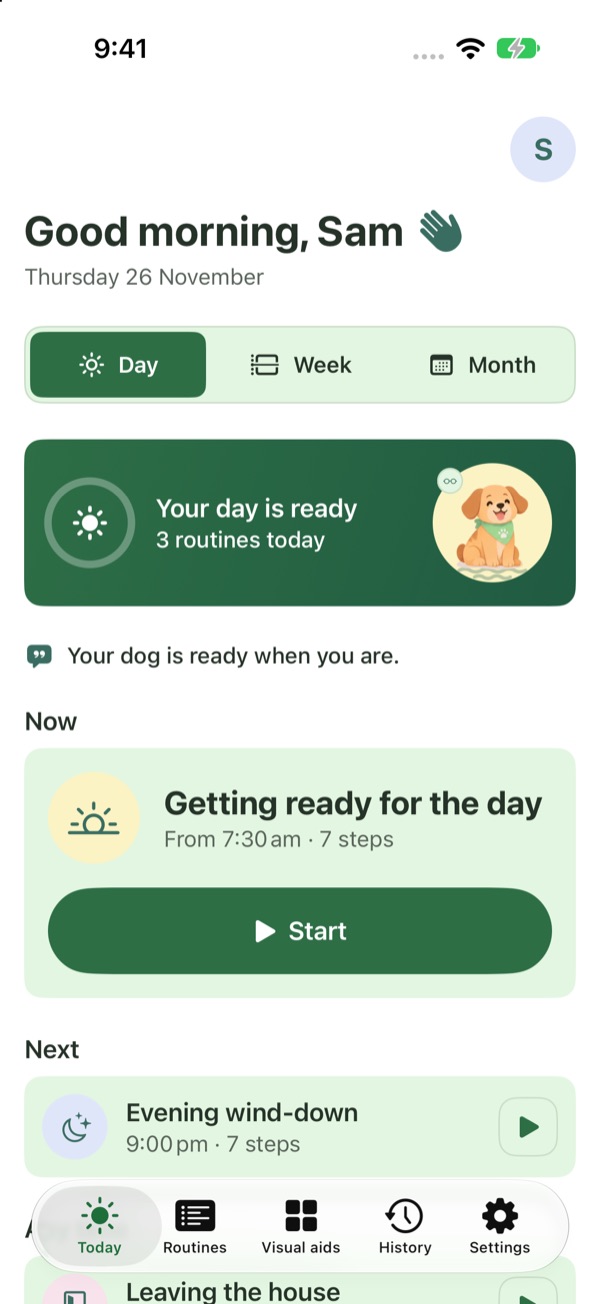
Today shows what's on now, what's next and what's later, and Dayling gives you a heads-up before it's time to switch.

One small step at a time, with your pet beside you.

27free starter routines
32more in Plus
2looks: Bright and Calm
0ads or accounts

Why Dayling

Getting started is often the hardest part.

Knowing what comes next, switching from one thing to another, keeping going when a step feels long: that's where a day can get stuck.

Dayling breaks each routine into small, clear steps, with pictures, a calm timer and a kind pet beside you. There's nothing to keep up, and no guilt on the days you take off.

Features

Understand, take part and grow

Everything in Dayling helps you know what's coming, do it your way, and need a little less help over time.

Today in Dayling: a greeting, Day, Week and Month to choose from, a card saying the day is ready with 3 routines and a puppy, and the routine on now with a Start button

Understand

Your day as Now, Next and Later, with pictures. Each routine is broken into small steps, with a photo or picture and the step read aloud, so you always know what comes next.

  • Today, this week or this month: tap a day to see its plan
  • 27 free starter routines to begin from
  • Steps from pictures, words and voice notes, and your own photos with Plus
  • Social narratives for the dentist, a haircut, a new school and more
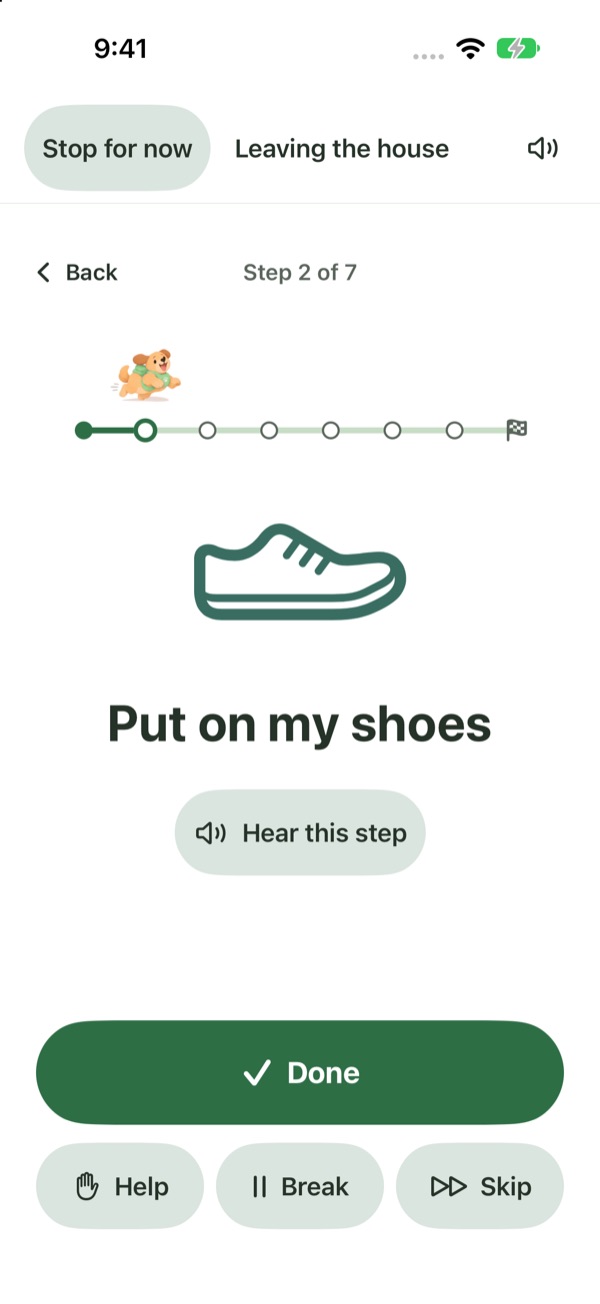
Step 2 of 7 of Leaving the house: "Put on my shoes", with a picture of a shoe, a puppy running along the progress line and a Hear this step button

Participate

One step at a time or a checklist, your choice. A calm timer, a break whenever you need one, and a Help button for more support or an "I need help" card to show someone nearby.

  • Done, Help, Break and Skip as you go
  • Starting late moves the rest of the routine along
  • Your cat or dog does each step with you
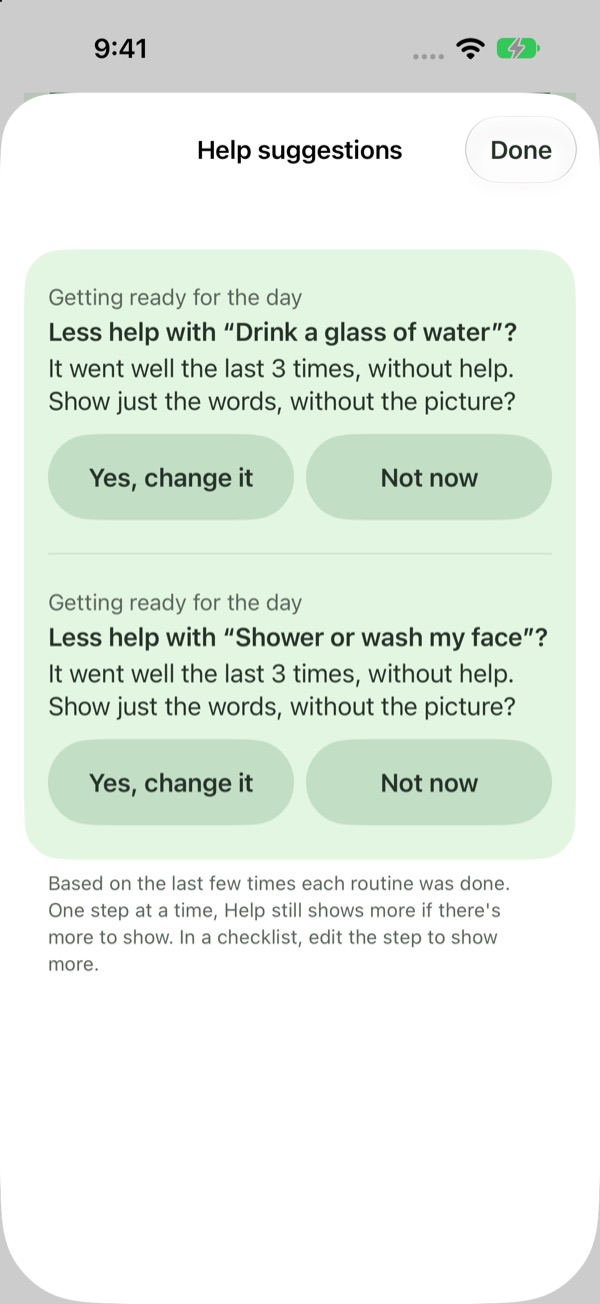
Help suggestions: less help for two steps that went well, each with "Yes, change it" and "Not now"

Grow

As steps get easier, the app suggests a little less help, and more when a step gets tricky. You or your supporter decide: nothing changes without your OK.

  • History and good days, never a count to lose
  • A pet that grows with you and takes rest days too
  • A check-in after each routine to mark steps too easy or confusing

How it works

Three steps, then it's part of your day

Set it up once, on your own or with a supporter. After that, Dayling reminds you when it's time and shows you what's next.

  1. Pick a routine

    Start from one of 27 free starter routines, such as Getting ready for the day, Bedtime or Going to the dentist, or make your own.

  2. Make it yours

    Choose a picture and words for each step, record your voice and add a calm timer if it helps. With Plus, use your own photos.

  3. Start it

    Play it one step at a time, with each step read aloud, or as a checklist with every step in view. Your cat or dog is there with you, and you can take a break or ask for help whenever you need.

Made for you

Made to fit your day

Calm by design, and it works the way you do.

Reminders that warn you first

A heads-up before it's time to switch, a Live Activity on iPhone while a routine runs, widgets for Now and Next and your good days, and your routines in your calendar if you want them.

Help that fits

Photo, picture, words or nothing at all, for each step. Less help as things get easier.

Support without surveillance

No ads, no accounts and no location tracking. Your routines stay on your device and in its own backup, unless you share them or add a routine to your calendar.

Works offline

Everything runs on your iPhone or iPad, with or without a connection. Only Today's weather, and buying, restoring, redeeming or managing Plus, need one.

Free and Plus

Free, with more in Plus

Free to download, with no ads. Plus adds unlimited routines and more.

Free

Everything here, for as long as you like.

  • Room for 3 routines on the device, shared by everyone: your own, or any free starter routine
  • Pictures, reading aloud, the pet, timers, reminders and widgets
  • Supporter mode with a child lock
  • Share routines with AirDrop or Messages
  • Cards to show: I need help, I need a break, Stop, Yes and No

Dayling Plus

Plus

For everyone in Dayling on your devices, however many people that is. Monthly or yearly.

  • Unlimited routines
  • Your own photos on steps
  • 5 more starter packs: school and uni, work, the kitchen, cleaning and laundry, out and about
  • Seasonal items and more places for your pet
  • App themes: Lavender Dream, Sky Blue and Peach & Coral
  • Visual aids: a First–Then board, choice boards, a visual timer, feelings cards and cards of your own
  • Family plans share Plus with up to five family members on their own Apple Accounts and devices

Plus Yearly and Family Yearly start with a 7‑day free trial for new subscribers, then renew at the yearly price shown in the app unless you cancel at least 24 hours before the trial ends. If Plus ends, every routine and everything made in visual aids keeps working. Can't afford Plus?

Questions

Questions, answered

Something else? See Support or email support@independencesupplyco.com.

Who is Dayling for?

Anyone who finds it hard to get started or keep going: teens and adults with ADHD, autism, an intellectual disability or a brain injury, adults with fatigue or memory changes, and families who set routines up together.

Is Dayling free?

Yes, it's free to download. The free version has room for 3 routines on the device, shared by everyone (your own, or any of the free starter routines), with pictures, reading aloud, the pet, timers, reminders, widgets, supporter mode, sharing, adding routines to your calendar and cards to show for I need help, I need a break, Stop, Yes and No, in the Garden Paws and Soft Nature themes. Plus adds unlimited routines, your own photos on steps, more starter packs, more for your pet, three more app themes, and visual aids: a First–Then board, choice boards, a visual timer, feelings cards and cards of your own. Plus Yearly and Family Yearly start with a 7‑day free trial for new subscribers, then renew at the yearly price shown in the app unless cancelled at least 24 hours before the trial ends.

What happens if Plus ends?

Nothing is taken away. Every routine you've made stays and still runs, photos and all, and so does everything you made in visual aids. The app goes back to Garden Paws, and keeps your chosen theme for when Plus is back. Adding routines past the third, adding photos, making or changing visual aids and choosing the Plus extras or themes need Plus again.

What if I take a day off?

Nothing happens. There's no count to lose and no guilt. The app counts your good days this month, and a fresh start button clears the day whenever you need it. History lists each routine you've finished, and its calendar ticks each good day: nothing marks a day off. Your pet takes rest days too.

Can a parent or supporter help set it up?

Yes. Supporter mode keeps changes to routines, visual aids, people and reminders behind a passcode on the same device, with a child lock that hides Skip, asks for the passcode at Stop for now, and keeps Settings for the supporter.

Does it collect my data?

Your routines, photos and voice notes stay on your device and in its own backup, unless you share them or add a routine to your calendar (its name, time and days go there, never a person's name). We only receive anonymous counts, such as how many routines were finished, never names, routine text, photos or audio, and you can turn those off. If you turn on Today's weather, Apple's weather service receives your approximate location, for the forecast. There are no ads and no accounts.

Which devices does it work on?

iPhone and iPad with iOS 18 or later, from the App Store in Australia and New Zealand. The optional alarm needs iOS 26 or later.

One step at a time

Dayling is coming soon to the App Store for iPhone and iPad.

Coming soon to theApp StoreFree to download